r/CoinBase Review
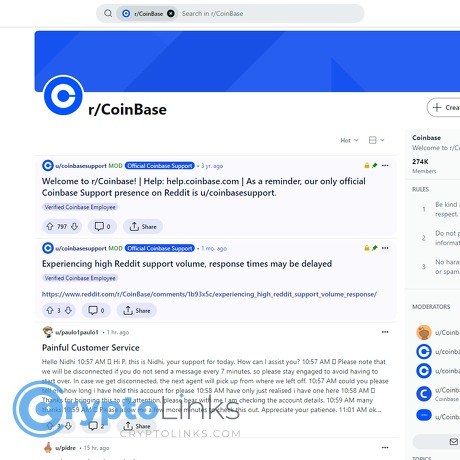
r/CoinBase
www.reddit.com
r/CoinBase Review Guide: Everything You Need To Know (with FAQ)
Stuck on a Coinbase issue and tired of waiting days for a reply? Wondering if r/CoinBase can actually help—or just waste your time?
Good news: when you use the Coinbase subreddit the right way, you can uncover real fixes, smarter advice, and faster clarity. The trick is knowing how the community works, what to post, and what to ignore.
Describe problems or pain
Most people land on r/CoinBase when something breaks at the worst time:
- Withdrawals or deposits stuck for hours—or days—without clear error messages.
- KYC/ID verification loops after moving, changing banks, or updating addresses.
- Missing funds or delayed transfers after sending to a wallet or between Coinbase and Coinbase Wallet.
- Fee and spread confusion when using Coinbase versus Coinbase Advanced.
The real headache? Separating solid answers from guesswork. It’s easy to:
- Follow outdated threads that no longer apply to the current app version or policy.
- Overshare sensitive details while trying to “prove” your problem.
- Get pulled into DMs by fake helpers and end up worse off.
Here are a few common patterns I see in r/CoinBase threads:
- “My withdrawal is pending forever.” Often tied to network congestion, low miner fees, or an internal review. People who check a block explorer and the Coinbase Status page usually avoid unnecessary panic.
- “Verification won’t pass.” Mismatched name/address formats or blurry documents are frequent culprits. Clean re-submission beats repeated retries in most posts that end well.
- “Why did I pay so much?” Many users mix up network fees vs exchange fees vs spread. The fastest way to clarity is comparing with Coinbase Advanced and reading the current fee schedule.
If any of that sounds familiar, you’re exactly who this guide is for.
Promise solution
I’ll show you how to get signal—not noise—from r/CoinBase:
- Understand the sub’s rules so your post doesn’t get removed.
- Search smarter and find fresh, relevant answers in minutes.
- Share the right details (and only the right details) to get useful replies fast.
- Spot bad advice and scams before they waste your time.
- Know when to stop posting and escalate directly with Coinbase.
What you’ll get from this guide
- A clear checklist to prep your post the right way.
- Safe formatting examples so you never leak sensitive info.
- A breakdown of frequent issues and what usually resolves them.
- A focused FAQ that tackles the questions users ask every week—including taxes and IRS visibility.
Quick win: Before you post, grab exact error text, timestamps (with time zone), and a redacted screenshot. Posts with these get helpful replies faster and avoid removal by mods.
Quick disclaimer
None of this is financial, legal, or tax advice. Treat the subreddit as a community resource—not official support. Keep your personal and account data private at all times.
- Never share: email, phone number, full name, 2FA codes, seed phrases, support ticket numbers, full transaction IDs tied to your identity, case IDs, or QR codes.
- Do share safely: region, product (mobile/web), coin or network, error message (exact text), timestamp window, and what you’ve tried.
Ready to make r/CoinBase actually work for you? In the next section, I’ll explain what the subreddit is (and isn’t), how it’s run, and who gets the most value from it. Want the fastest way to avoid post removals and bad advice?
What r/CoinBase is, how it works, and who it’s for
Think of r/CoinBase as a smart, fast group chat for Coinbase users—run by the community, watched by moderators, and occasionally seen by Coinbase staff. It’s not official support. It’s peer-to-peer help where people trade fixes, screenshots, and stories that help you spot what’s going on with your account without waiting a week.
It’s especially useful if you’re trying to understand whether your issue is unique or widespread, what other users have tried, and where the latest app or policy changes might be causing friction. Newcomers use it to figure out basics and expectations; experienced users hang around to flag bugs, outages, and scams.
“Reddit won’t fix your account, but it will fix your blind spots.”
Community snapshot and common topics
You’ll see a rhythm to the posts, and it mirrors what’s happening on the platform and the market. When prices move hard, expect a wave of “pending” and “stuck order” threads. During compliance pushes, it’s all about verification and limits.
- Account reviews and KYC/limits: “My ID’s been ‘under review’ for 48 hours—normal?”
- Transfers and withdrawals: “BTC shows sent, but no confirmation yet—what now?”
- Fees and spreads: “Why did I pay more on the app than on Advanced?”
- Staking and rewards: “Has staking APY changed in my state?”
- Outages and performance: “Charts frozen, orders not filling—anyone else?”
- Policy updates: “New region restrictions—who’s affected?”
- Scam alerts and impostors: “DM’d by ‘support’ asking for a seed phrase—legit?”
- App quirks: “Face ID loop when logging in, fix?”
As a quick proof of how communities like this work, Pew Research has shown Reddit users often turn to the platform for real-time problem solving and news tracking. That’s exactly why r/CoinBase can feel so useful during fast-moving situations—patterns surface quickly, and the loudest problems rise to the top.
Rules, flairs, and how not to get removed
Moderators keep the place usable. Break the rules or expose sensitive info and your post will vanish—sometimes automatically.
- Pick the right flair: Choose the closest fit (e.g., “Question,” “Bug/Issue,” “Withdrawals,” “Verification,” “PSA”). It helps the right people find you.
- Use a clear title: “Withdrawal pending — US — SOL — 90 minutes — ‘Network congestion’ message.”
- Don’t post sensitive data: No emails, phone numbers, order IDs, case numbers, barcodes, or anything tied to identity. Keep screenshots redacted.
- No spam or referrals: You’ll be removed and possibly banned.
- Keep it constructive: Describe what happened, not just “Coinbase stole my money.” Useful detail gets useful help.
Heads up: AutoMod can hold or remove posts that look risky. A short text body that explains your issue and shows you’ve tried basic steps usually avoids that. If you think your post was wrongly removed, use Modmail—but don’t expect account-level help there.
Search first: the fastest fix
The fastest answer is often one someone already posted last week. Searching smart saves hours.
- Sort by Top + Recent: On r/CoinBase, filter by flair and sort by “Top” for the past week or month.
- Use Google with operators: site:reddit.com/r/CoinBase “verification loop” or site:reddit.com/r/CoinBase “ETH withdrawal pending”. Click “Tools” and limit to the last 3–6 months so you don’t chase outdated advice.
- Search by error text: Paste the exact message in quotes—“This payment method can’t be used” often brings up precise threads.
- Filter by your setup: Add “Android”, “iOS”, “US”, or your country to match your context. Fixes can be region- or platform-specific.
Policies, fees, and flows change. That’s why freshness matters. A post from 2022 might be totally wrong in 2025.
When to post and what to include
Post after you’ve checked the obvious so your thread attracts real answers, not the same three “did you restart?” comments.
- Post timing: After you’ve checked the Coinbase Status page, updated the app, and tried a quick relogin or cache clear.
- Share non-sensitive context:
- Country/region
- Product: Coinbase app, web, or Advanced
- Asset/network: e.g., ETH on Base vs ETH on mainnet
- Timestamps: when it started, how long it’s been pending
- Exact error message(s)
- What you already tried (briefly)
- Redacted screenshot if it clarifies the problem
- Keep private things private: Don’t post emails, phone numbers, case IDs, order IDs, or QR codes. If you need to mention a case exists, say “I opened a support ticket” without numbers.
- Helpful title formula: [Flair] — Region — Platform — Asset/Network — Symptom — Time window
Threads with this structure get better answers because the right users recognize the pattern fast. You’ll also help the next person who searches the same issue—pay it forward.
I’ll show you where it shines, where it wastes your time, and how to tell the difference in minutes—ready for the honest breakdown?
Strengths and weak spots: Is r/CoinBase actually useful?
Short answer: yes—when you use it intentionally. When your withdrawal is stuck or KYC keeps looping, fast pattern recognition beats waiting on hold. r/CoinBase shines at surfacing real-world signals quickly, but it’s not a magic fix for account-specific problems.
“Fast answers feel good. Correct answers protect your account.”
What it does well
Here’s where the subreddit earns its keep, especially if you’re trying to separate “just me?” from “everyone is seeing this.”
- Lightning-fast pattern spotting. If five people in an hour report “ACH pending longer than usual” or “SOL withdrawals queued,” you’ve likely got a platform-wide slow-down, not a personal issue. I’ve watched surges of posts hit r/CoinBase minutes before updates appeared on Coinbase Status or on Downdetector. That saves you time and stress.
- Practical, low-risk tricks from real users. Things like switching from the app to the web version for ID verification, clearing cache, toggling Wi‑Fi vs. mobile data, or re-uploading documents with better lighting and no glare. These aren’t glamorous, but they solve a surprising number of glitches.
- Links to official sources. The best commenters back claims with receipts—screenshots of status.coinbase.com updates, Help Center articles, or a mod-sticky. Those links help you confirm whether to wait or escalate.
- Real-time risk radar. Scam warnings pop up fast. If there’s a wave of fake “support” DMs or a phishing domain making the rounds, you’ll often see it flagged in the comments before it hits broader headlines.
Quick example: you post that your ETH withdrawal is “Pending” with no TXID. Within minutes, several users note the same thing, link the Status page, and mention a security hold window others are experiencing. That tells you it’s not a personal security breach, and messing with settings won’t help. You monitor the Status page, and a few hours later your TXID appears. No panic, no risky shortcuts.
Where it falls short
Reddit is a community forum—not an account console. It’s powerful for context, weak for anything that requires identity or security checks.
- No account-level access. Mods and commenters can’t see your KYC, holds, or internal flags. Complex compliance reviews won’t be solved in a thread.
- Hearsay spreads fast. Popular advice isn’t always accurate. I’ve seen “fixes” like filing bank disputes to cancel pending transfers—moves that can trigger permanent account restrictions.
- Old answers look fresh. Search engines surface years-old threads. Crypto policies and UI change fast; always check dates and compare with the Help Center.
- Selection bias. People who resolved issues often stop posting, while those still stuck keep commenting. You’ll see more pain than resolution, which can skew your expectations.
Keep a simple rule in mind:
Trust the crowd for patterns. Verify the details with official sources.
The role of moderators
Mods do the unglamorous work that keeps the sub usable: removing posts with exposed emails, nuking “support agent” scams, and enforcing the posting rules so everyone can find help faster. If you spot suspicious comments, report them. If your post gets removed for missing flair or personal info, fix it and repost. Important: mods can’t access your account or speed up reviews. Use Modmail for rule enforcement or scam concerns—not for ticket escalations.
Alternatives and complements
Use r/CoinBase to listen and compare experiences. Use these to actually resolve account-specific issues:
- Coinbase Help Center: Search exact error messages; match your region and product.
- Coinbase Status: Confirms outages, degraded performance, and maintenance in real time.
- In‑app support: Open a ticket from the app or web, keep the case ID, and follow up in the same thread (changing channels slows things down).
- @CoinbaseSupport on X: Useful for broad updates and acknowledging incidents. Always check the handle—impersonators are common.
- Specialists when needed: For taxes, use a qualified tax pro or reputable crypto tax software. For security hardening, consider hardware keys (e.g., FIDO2/U2F) and better device hygiene.
When your money feels stuck, minutes feel like hours. That’s exactly when the sub is most helpful for signal—but also when you’re most vulnerable to bad advice. Want a simple, safe way to use r/CoinBase without risking your account or identity? In the next section, I’ll show you the exact privacy habits and red flags I rely on—starting with the one mistake that scammers bet you’ll make. Are you making it right now?
Staying safe: how to use r/CoinBase without risking your account
Reddit is public, permanent, and indexed by search. Post the wrong detail and you can hand scammers the exact clues they need. Keep it high-level, keep it clean, and never move to DMs with strangers—no exceptions.
"Scams don’t just steal coins. They steal time, sleep, and peace of mind. Guard those first."
Privacy basics
Only share what a stranger couldn’t use to impersonate you, phish you, or “reset” your accounts. I treat anything that could tie me to an account or transaction as toxic on public threads.
- Never share: email, phone number, full name, address, government IDs, or device info.
- Never post: ticket numbers, case IDs, order IDs, or unique reference numbers (scammers use these to impersonate staff).
- Seed phrase, 2FA codes, backup codes, SMS codes: absolutely off-limits. No real helper needs them, ever.
- Transaction hashes linked to your identity: if a TXID can be tied back to your KYC identity or exchange account, don’t post it. If a TXID is essential for context, share only truncated characters (e.g., first/last 6) and say you can provide full TXID to official support via the app.
- QR codes and barcodes: these often encode order IDs or addresses; blur or crop them out.
- Wallet addresses and exact balances: unnecessary and risky—hide or shorten.
Two quick habits that save headaches:
- Use a Reddit handle that doesn’t match your real identity and turn off chat requests from strangers in your Reddit settings.
- Stick to official domains when someone links help: coinbase.com and help.coinbase.com. Anything else? Assume it’s bait.
Useful primers from Coinbase: security basics and Help Center (search “phishing” and “keep your account secure”).
Spotting scams and fake helpers
Scammers love busy subreddits. The FTC notes consumers have reported losses of over a billion dollars to crypto scams since 2021—much of it starting on social platforms. If someone “helps” a little too fast, assume they’re testing your guardrails first.
- “Support agent” in your DMs or comments: instant red flag. Community subs are not official support. Real teams won’t cold-message you to “fix” something.
- Google Forms or Typeforms: no legit support uses these for account fixes. They’re data traps.
- “Remote fix” via AnyDesk/TeamViewer/Screen share: 100% scam. No support needs your desktop.
- “Validation” transactions or “priority unlock” deposits: classic trick to make you send funds first.
- “KYC reset” links: if it’s not inside the app or on help.coinbase.com, it’s phishing.
- “We’ll recover your seed for you” or “airdrop claim” requests: engineered theft. Walk away.
- Fresh accounts with low karma + aggressive urgency: behavior > badge. Don’t follow them off-platform.
References you can check and share with friends who are new to crypto:
- FTC Data Spotlight: reports show scammers cashing in on crypto
- Coinbase Learn: Security
Reporting bad actors
Don’t argue with scammers. Just nuke the exposure and keep moving.
- Use Reddit’s “Report” on the comment or DM (choose scam/spam/impersonation).
- Message the mods with links, screenshots (redacted), and a short note: who contacted you, where, and what they asked for.
- Block the user so they can’t re-approach you from the same account.
Mods want to keep the sub clean, but they’re not your account support—and they’ll never ask for sensitive info.
Safe post template you can copy
Use this structure so helpers can quickly triage without risking your privacy:
- Problem summary: one sentence (e.g., “ETH withdrawal stuck as ‘pending’ for ~6 hours”)
- Platform: mobile app or web
- Region: country/state (high-level only)
- Asset: coin or token
- Time window: local time + time zone
- Error message: exact wording (no IDs)
- What I tried: steps you already took
- Status checks: Coinbase Status, network/mempool looked okay? yes/no
- Screenshots: attached with IDs/QRs blurred (optional)
Example (safe):
- Summary: USDC withdrawal to my self-custody wallet shows “pending” for ~9 hours.
- Platform: Coinbase mobile app (iOS)
- Region: US
- Asset: USDC on Ethereum
- Time window: 2:10–11:30 pm PT today
- Error: “Withdrawal pending – under review”
- Tried: restarted app, checked email/SMS for verification prompts, read Help Center article on pending withdrawals
- Status checks: Coinbase Status shows all green; ETH gas stable
- Screenshot: attached with order ID/QR blurred
Screenshots done right
Screenshots help, but only when they don’t leak IDs or personal trails.
- Blur/crop: full name, email, order IDs, case IDs, QR/barcodes, wallet addresses, and balances.
- Kill metadata: screenshots are better than photos; if you must share a photo, scrub EXIF data using your phone’s editor or a privacy app.
- Show the message, not the map: capture the error text and the status indicator; leave everything else out.
- TXIDs: share only if critical—and then truncate (e.g., 0x1234…ABCD). Never post TXIDs that clearly tie back to your KYC account.
- Test your redactions: don’t just “dim” or highlight—use a solid blur or box so IDs can’t be enhanced.
One last mental model I use: if a detail would help a stranger pretend to be me with support, that detail never goes on Reddit. Period.
Next up: the recurring issues everyone posts about—account locks, missing transfers, fee surprises, and outages—and the exact playbook I use for each. Which one’s on your plate today?
Hot topics you’ll see a lot—and how to handle each one
I see the same Coinbase headaches pop up on r/CoinBase every week. When you know what bucket your issue fits into, you can skip the noise and fix things faster. Here’s how I handle the most common ones, what to check first, and what to ignore.
“The fastest way to lose money in crypto isn’t volatility—it’s impatience.”
Account locks, reviews, and KYC loops
When the app says “account under review” or you’re stuck in an ID loop, it’s almost always compliance-related. It feels personal, but it’s usually automated risk checks doing their job.
- Match everything exactly. The tiniest mismatch (nickname vs legal name, old address, abbreviations) can re-trigger reviews. Use your legal name and the address on your ID/bank statement.
- Upload clean documents. Bright, flat, no glare. Avoid camera filters. Use a high-resolution photo of the physical document, not a screenshot of a PDF.
- Don’t spam submissions. Re-submitting the same day can prolong reviews. I wait 24–72 hours between attempts unless Coinbase explicitly asks for a new doc.
- Explain changes. If you recently changed names, moved, or added a new bank, note that in your official ticket. Consistency and context help.
- Expect timeframes. Some reviews complete in hours; deeper checks take days to weeks. Reddit can confirm “you’re not alone,” but it won’t speed compliance.
Real sample: A user updated their address and added a new bank card the same day they made a large purchase. That combo commonly flags a review. In cases like this, I pause new activity, keep funds where they are, and wait for the cycle to finish.
Transfers pending or missing
First question: is your transfer on-chain yet? The answer determines the next step.
- If you have a TxID:
- Paste it into a block explorer:
Etherscan (ETH),
mempool.space (BTC),
Blockchain.com (multi-chain).
- Check status, fee, and confirmations. If confirmations are below Coinbase’s requirement for that asset, it’s just a waiting game.
- If confirmed and still not credited after the asset’s standard confirmations, grab a screenshot of the explorer and open a ticket.
- Paste it into a block explorer:
- If you don’t have a TxID (it just says “pending”):
- That usually means an internal review or payment method hold. ACH buys, for example, can lock withdrawals until funds settle.
- Don’t re-send or cancel if the app discourages it. Wait for either a TxID to appear or the order to fail and reverse.
- Outgoing stuck? On Bitcoin, low fees can stall in the mempool. Some wallets support RBF (replace-by-fee), but Coinbase may not let you bump fees after submission. If speed matters, select a higher fee up front during busy times.
Quick cues: Lots of similar posts at once? Check Coinbase Status. If the network is congested (e.g., BTC mempool spikes), increasing fees or waiting for quieter hours works better than tinkering with settings.
Fees, spreads, and limits
Fee complaints happen daily, but most confusion is about the spread (the difference between the price you see and the effective buy/sell price) versus the explicit fee you’re charged.
- Compare platforms inside Coinbase. The regular app bakes in higher spreads for convenience. Coinbase Advanced shows order-book pricing and usually offers lower fees for limit/market orders.
- Do the math. Don’t just look at the line-item fee. Calculate your effective price:
Effective price = total cost / crypto received. Compare it to spot on Coinbase Advanced or a reputable index. - Limits aren’t just about identity. Purchase and withdrawal limits also depend on payment method and account history. ACH has different holds than wire; new users often see tighter caps.
- Read the fee schedule. Coinbase updates pricing. Always re-check the current structure on the official pricing and fees page before large trades.
Sample: I’ve seen “0% fee” posts where the spread was 1.2% compared to Advanced’s book at that moment. If you’re buying size, using a limit order on Advanced can cut costs dramatically, especially during volatile moves.
Taxes and the IRS: what users ask and what’s true
Short version: activity on KYC exchanges isn’t private from tax authorities. In the U.S., exchanges generally report certain info and may issue tax forms depending on what you did.
- Expect reporting. U.S. rules for digital asset “brokers” are expanding. The IRS has announced new frameworks (including Form 1099-DA beginning with the 2025 tax year under final regulations). Keep your records clean.
- Self-custody ≠ invisibility. Wallets you control aren’t auto-reported, but once funds touch a KYC exchange, they can often be linked. Blockchain analytics firms make this easier every year. See the
Chainalysis 2024 Crypto Crime Report for how flows are traced at scale.
- Helpful explainer: Blockpit’s guide on whether the IRS can track crypto and which exchanges report breaks down practical scenarios:
Can the IRS track crypto? (2025 update).
- Action steps now:
- Export all trade, earn, and transfer history yearly.
- Track cost basis and lot selection (FIFO/HIFO) with a reputable tax tool.
- If you’ve moved funds across chains or wallets, document TXIDs—your future self will thank you.
Reality check: The IRS can request records from exchanges. Staking/earn rewards and sales are typically taxable events. If you’re unsure, talk to a tax professional—waiting until April is the costliest strategy.
Outages and stuck orders
When markets jump, platforms creak. If you see a burst of “failed order” posts, assume it’s not just you.
- Check systems first. Look at Coinbase Status and official X/Twitter updates. If there’s a known incident, stop fighting the app.
- Use limits, not panic-market buys. During peak volatility, market orders can slip hard. A limit order on Coinbase Advanced anchors your price and reduces regret.
- Reduce size, split entries. Smaller orders fill more reliably in thin or laggy conditions. If one fails, don’t mash “Buy” repeatedly—you’ll chase the wick.
- Expect fills after the fact. If the app lagged, avoid duplicate orders. Wait, then check your fills and balances before submitting again.
Pro tip: I keep a few pre-set limit orders on Advanced during high-volatility windows. If the platform hiccups, the order still sits on the book and often gets the fill I wanted without me battling the UI.
All of this gets easier when you follow a simple flow from “problem spotted” to “resolution in motion.” Want the exact checklist I use, step by step, including what to gather before you post on Reddit so you don’t waste time—and how to escalate when it’s not a community fix?
Step-by-step: from Reddit post to real resolution
I use a simple flow every time I jump into r/CoinBase for help: prep smart, post sharp, sort the replies, and escalate when it’s time. It saves hours, sometimes days. Here’s exactly how I do it—plus real examples and the little tweaks that improve your odds of getting useful answers.
Prep checklist
Before I post, I make sure I’m not chasing a ghost report or a known outage. My quick pre-flight list:
- Check platform status: Coinbase Status for incidents, plus a quick look at social posts for spikes in reports.
- Update the app/browser: App Store/Play Store versions, or clear cache and try another browser (Chrome/Firefox) on desktop.
- Check network health: BTC mempool and ETH gas are the usual culprits. High fees = longer confirms for low-fee sends.
- Search the sub (last 3–6 months): Sort by Top + filter by flair. If five threads today match your issue, it’s probably not you.
- Collect clean details:
- Country/region, product (app/web/Advanced), coin/network
- Exact error text and code, timestamps (UTC helps), device/OS/app version
- Redacted screenshots (hide email, order IDs, QR codes, addresses tied to identity)
Mini-win I see repeatedly: Converting your timestamps to UTC and pasting the exact error copy (“Your account is under review. Code: A-201”) gets faster, better-targeted replies.
Why this works: usability research consistently shows that specific titles and concrete details lead to faster, higher-quality responses. For example, Nielsen Norman Group highlights how descriptive microcontent boosts scanning and response, and a peer‑reviewed study on developer Q&A found that questions with reproducible info and logs receive more and better answers (Calefato et al., 2018).
Post smart, then monitor
Good posts get help. Great posts get fast help. I follow a simple format:
- Title formula: [Product] [Region] [Issue] [Error/Code] [Time window]
- Weak: “Help please”
- Strong: “Coinbase app (US): ETH send stuck at ‘Pending’ for 3h — no TXID, code A‑201”
- Use the right flair: Support/Question/Outage. It helps mods and users filter.
- Paste the safe template:
Problem: US, app (iOS 17.5), Coinbase (not Advanced). Trying to send 0.12 ETH to my Ledger.
Error: “Something went wrong, please try again later” — no TXID generated.
When: 2025‑01‑12 14:15–17:30 UTC.
Tried: Updated app, switched Wi‑Fi to LTE, reinstalled, tried web (same error), checked Coinbase Status (no incident), ETH gas ~18 gwei.
Screenshot: redacted (error banner only, no IDs).
- Monitor like a pro:
- Reply to helpful comments within an hour if you can. Early activity keeps your post visible.
- Edit the post with bold updates: Update 1 (UTC time): what you tried + what changed.
- Answer clarifying questions once, then add the info to the main post so others don’t repeat them.
Example update: Update 1 — 16:40 UTC: Switched to web, same error. Tried a smaller send (0.02 ETH) — also failed. Opened in‑app ticket; case ID on hand.
Filter advice
Not all replies are equal. I triage them fast using a simple filter:
- Strong signals:
- Links to official docs or Coinbase Status
- Exact steps with matching product/region (“US, ACH deposit hold window explains this”)
- Proof that they reproduced your issue or fixed the same one recently
- Weak signals (be cautious):
- “DM me on Telegram/Discord,” “I can fix it remotely,” Google Forms requesting info
- Advice that needs seed phrases, 2FA reset for no reason, or third‑party APK installs
- Vague claims, no timestamps, no region/product details
My “risk ladder” for trying suggestions:
- Low risk: Switch network, clear cache, try web, toggle Wi‑Fi/LTE, re‑login, wait 30–60 minutes.
- Medium risk: Re‑verify identity, re‑link payment method, cancel an unbroadcasted order.
- High risk: 2FA reset, removing security keys, installing remote‑access tools — only do via official support.
Quick check on a commenter: Click their profile. Helpful history in crypto support subs? Or brand‑new account pushing DMs? That 10‑second check prevents a lot of headaches.
When to escalate off Reddit
Reddit is for pattern‑spotting and community tips. The moment your issue touches identity, fraud, or compliance, I escalate to official support and keep everything in one lane.
- Open a ticket inside the app/site: Pick the closest category; attach redacted screenshots; describe the timeline in UTC.
- Save your case ID: Paste it into a notes app. You’ll need it for follow‑ups.
- One thread, one case: Don’t open multiple tickets — it can slow you down. Reply to the same case instead.
- Document everything: Times, responses, attachment filenames. It helps if you need to escalate further.
- If funds/security is at risk: Freeze linked cards/bank if needed, then inform support in the same case thread immediately.
Example handoff message in your Reddit post:
Update 2 — 18:05 UTC: Opened in‑app ticket (Case #CB‑1234567). Will post back when support replies. If you had the same “A‑201” error this week, did your review complete? How long did it take?
Timeline expectations
Setting the right clock prevents panic. These are realistic windows I see again and again:
- UI/app quirks (login loops, screen bugs): hours to 1 day after updating/clearing cache.
- On‑chain network congestion: depends on fee/confirmations. BTC low‑fee sends can take many hours during spikes; ETH varies from minutes to a few hours.
- Internal reviews (compliance, unusual activity): typically days to weeks. Some clear in 72 hours; complex cases can exceed 14 business days.
- 2FA resets/account recovery: often 24–48 hours, longer if manual checks are needed.
- ACH deposit holds (US): commonly up to 5 business days before full withdrawal availability.
While waiting, I avoid moves that complicate the review: opening duplicate tickets, changing lots of account details, or resubmitting the same transaction repeatedly. Instead, I keep my Reddit thread updated for others who land in the same spot tomorrow — it’s good karma and it actually attracts better responses from people who’ve solved it.
Want quick, no‑fluff answers to the questions everyone asks next — from IRS visibility to whether the sub is “official support”? That’s exactly what I’m covering in the final section. Which question do you want answered first?
r/CoinBase FAQ and final takeaways
Quick answers to the questions I see every week, then a short wrap-up so you can move with confidence.
Can the IRS see my Coinbase wallet?
Short answer: yes, activity on Coinbase is not private from tax authorities. Here’s the practical picture:
- Reporting happens. US exchanges collect KYC data and report certain information to the IRS. The IRS also issues summonses and requests records from exchanges when needed. Coinbase publishes a transparency report showing government and law enforcement requests, which gives you a sense of how often data is requested.
- New broker rules are rolling out. The IRS finalized digital asset broker reporting regulations in 2024, with phased requirements beginning for tax year 2025 (returns filed in 2026). See the IRS announcement here: IRS final regulations on digital asset broker reporting.
- Self-custody isn’t “invisible.” Wallets you control aren’t automatically reported, but once funds move through a KYC exchange, blockchain analytics and exchange records can often link activity to you.
What I recommend:
- Keep clean records for every deposit, withdrawal, trade, reward, and fee.
- Label internal transfers so your tax tool doesn’t double-count.
- If unsure, talk to a qualified tax professional.
For a plain-English explainer on what the IRS can see and which exchanges report, check Blockpit’s IRS tracking guide (2025 edition). It breaks down what actually gets reported and why.
Example: If you move coins from your hardware wallet to Coinbase and sell, the sale and related info can be reported by the exchange, and the deposit address is tied to your verified account. That linkage is what makes activity traceable.
Is r/CoinBase official support?
No. It’s a community subreddit. Mods can’t see your account or push a fix through compliance. Use it to spot patterns, get tips, and sanity-check timelines, then use official channels for anything account-specific.
Here’s how I split it:
- Use the subreddit to confirm if an outage is widespread, learn known workarounds, and avoid repeating common mistakes.
- Use Coinbase support in the app or on the website for KYC issues, account locks, unauthorized access, missing TXIDs, and anything that needs identity/security checks. Open one ticket, keep the case ID, and follow up in the same thread.
Tip: If people start DM’ing you “support” offers after you post, ignore and report. Real support won’t ask for seed phrases, 2FA codes, or remote access.
Wrap-up and next steps
r/CoinBase is great for speed and signal, not for unlocking accounts. Use it to spot patterns, pressure-test advice, and avoid traps—then escalate through official channels when it’s about your identity, funds, or security.
- Bookmark your safe-post template so you can share details without exposing sensitive info.
- Subscribe to Coinbase Status for instant outage alerts.
- Keep a one-page “incident log”: timestamps, error text, redacted screenshots, case IDs, and what you’ve tried. It saves hours.
- Validate replies with links to official docs or recent reports, and prioritize comments that match your region/product.
If you want curated tools for security, tax, and compliance, I keep an updated list on Cryptolinks.com, and I’m posting practical, no-nonsense walkthroughs on cryptolinks.com/news. Stay safe, stay curious, and keep receipts.
CryptoLinks.com does not endorse, promote, or associate with subreddits that offer or imply unrealistic returns through potentially unethical practices. Our mission remains to guide the community toward safe, informed, and ethical participation in the cryptocurrency space. We urge our readers and the wider crypto community to remain vigilant, to conduct thorough research, and to always consider the broader implications of their investment choices.